

Your server holds a bucket token. It exchanges that token for short-lived S3 credentials from Upstash, signs individual URLs with those credentials, and hands only the URLs to the browser. Every URL a browser holds is scoped to one object, one method, one set of headers, and a few minutes.
This page explains what a browser holding one of these URLs can and cannot do. To upload a file, start with the Quickstart instead.
What never reaches the browser#
UPSTASH_BLOB_TOKEN, in any form.- The key that signs completion tokens. It never leaves your process.
- The temporary S3 credentials. They are only ever folded into a signature.
- Any ability to list, read, overwrite or delete outside the one object a presigned URL names.
- Anything
contextoronBeforeUploadcomputed, except what you explicitly return asmetadata(visible on the object) orstate(visible in the completion token).
The bucket token#
UPSTASH_BLOB_TOKEN packs three things the SDK reads locally, with no network call:
- The bucket id, which names the bucket inside your account.
- The public DNS label, from which
bucket.publicUrl(path)builds a URL. Whether the bucket serves one at all is not in the token: the SDK learns that from the credentials response. - A secret key, used only to sign completion tokens inside your own process. It is never sent anywhere, not to Upstash and not to storage.
A malformed or tampered token is refused when it is decoded rather than on the first request.
The token is a bearer secret. Anything holding it can mint credentials for the whole bucket. Keep it server side; see Connecting.
Minting temporary credentials#
The token is not an S3 credential. To touch storage, the SDK exchanges it with Upstash for a short-lived one. That exchange also tells the SDK where the bucket lives, when the credential expires, and whether the bucket is public or private.
Credentials are cached per token rather than per Bucket instance, so constructing a bucket inside a request handler is free. Concurrent callers share one in-flight mint, and a credential is refreshed shortly before it expires.
A failed mint surfaces as unauthorized (the token was rejected), rate_limited, not_ready or mint_backoff. See Credential errors.
Signing a request#
Signing is AWS Signature Version 4. Requests your server makes to storage carry the signature in an Authorization header. Every URL handed to a browser, and every URL from signedReadUrl() or signedUploadUrl(), carries it on the query string instead.
Signed headers#
A presigned URL can pin headers, and the client then has to send them back exactly. Change a value, or omit a header the URL declared, and storage answers 403. This is enforced by the signature itself, not by the SDK.
Query parameters work the same way. The download filename on a signed read URL rides inside the signature, so a link whose filename was edited afterwards is refused.
Path encoding#
Paths are percent-encoded per segment, so slashes stay structural and everything else survives.
A path containing a . or .. segment is refused rather than normalized. Your server's credential authorizes the whole bucket, and the URL parser resolves .. before signing, so a traversing key would sign a request against a different object than the one your code named. uniquePath guards the same boundary from the other side; see Writing.
How long a presigned URL lives#
A presigned URL cannot outlive the credential that signed it, so the SDK never signs a link for longer than the credential has left. Read links default to 5 minutes, write links to an hour.
Cache the link until expiresAt and re-sign after. See Use expiresAt.
The direct upload handshake#
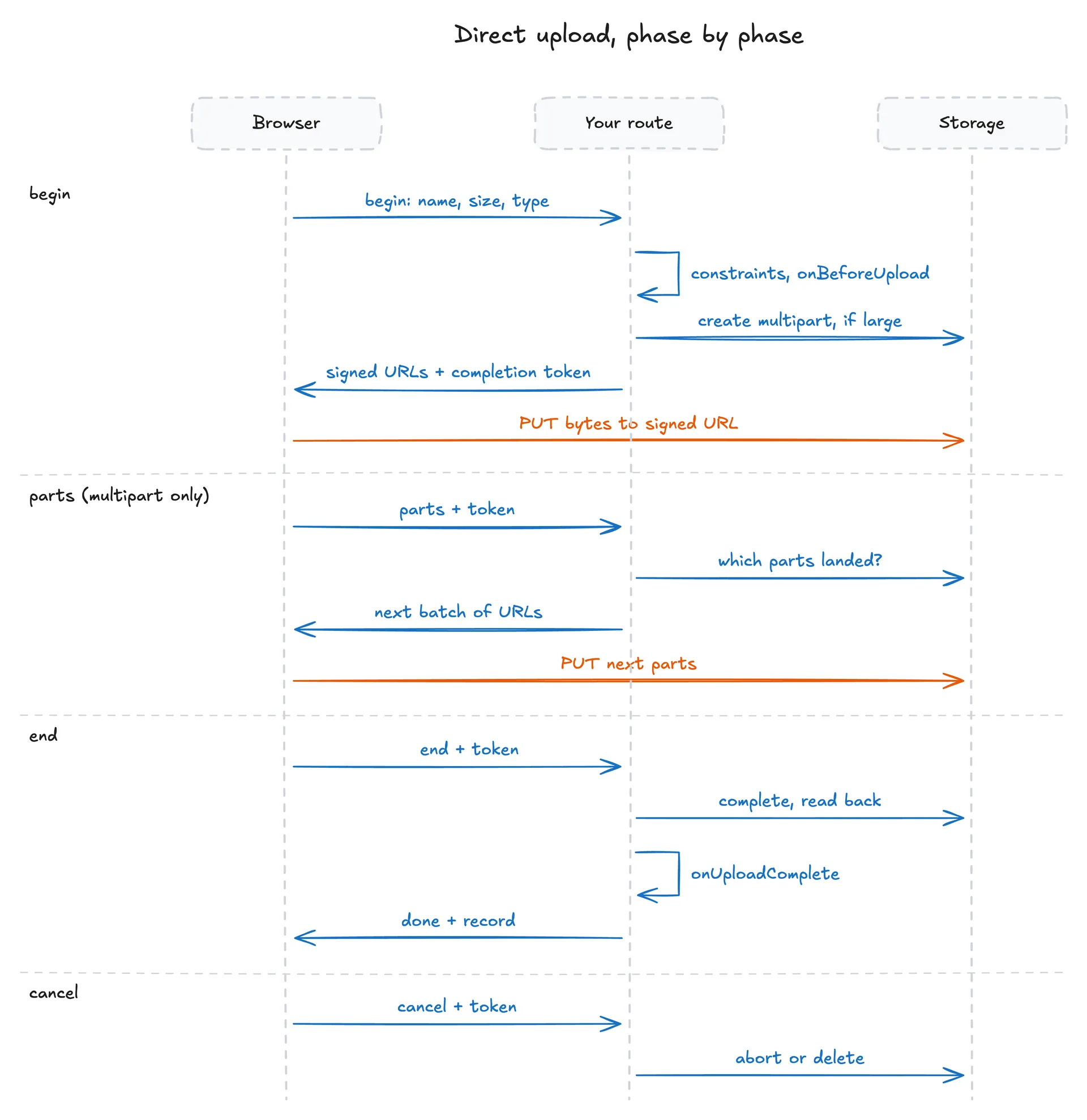
A direct browser upload is four phases against your own route. Each phase signs something different:
| Phase | What it signs |
|---|---|
begin | The first PUT URL, or the first batch of part URLs, and the completion token |
parts | The next batch of part URLs, after verifying the completion token |
end | Nothing new. Verifies the token, completes the upload, runs onUploadComplete |
cancel | Nothing. Verifies the token, aborts the multipart or deletes a matching single-PUT object |
The browser sees per-object presigned URLs, the headers those URLs pin, and a completion token. Nothing it holds can list the bucket, read another object, or write to a path your onBeforeUpload did not choose.
The completion token#
The completion token carries an upload's identity between phases, so your route keeps no server state. It is signed with a key derived from the bucket token, which never leaves your process.
It pins everything the browser must not be able to change: the path onBeforeUpload chose, the declared size and type, the headers signed into the upload, the bucket, and the route. It also carries the upload id your onUploadComplete sees as uploadId, and whatever onBeforeUpload returned as state. It expires after seven days.
The token is signed, not encrypted. Anyone can open devtools and read the payload, including state. Put a row id there, never a secret, a signed URL, or an internal flag.
A token that fails any of those checks is forbidden, not a 500. A token minted at one route is not spendable at another, so a 2 MB avatar route's token cannot be spent at a 2 GB video route. Two handlers on one bucket that mount the same route names need an endpoint to tell them apart.
Changing a route's constraints invalidates completion tokens issued under the old shape, since the grant no longer describes what the route enforces.
Pinned headers, and why the browser cannot forge metadata#
For a file under the multipart threshold, the browser writes the object itself with a single PUT. Everything the object should carry is decided on your server and pinned into that URL's signature:
content-type, from the file the browser declaredcache-control, resolved from the route's or bucket's cache option and the bucket visibility- every
x-amz-meta-*derived from themetadatayouronBeforeUploadreturned content-length, the exact declared sizex-amz-meta-upstash-upload, the marker
Because these headers are signed, the browser must send them exactly as given. An unsigned header would be the browser's to choose, and then the owner your app reads back in onUploadComplete would be the client's to write.
For a multipart upload the same headers are set by your server when it creates the upload, and the object inherits them at completion. Part URLs pin only the part's length.
The upstash-upload marker#
On a single PUT, the SDK writes a random id as x-amz-meta-upstash-upload and signs it into the URL. The browser cannot set it or change it, and metadata["upstash-upload"] from your own onBeforeUpload is refused as reserved.
It answers one question: did the bytes at this path come from this upload? A multipart upload knows by construction, since the object does not exist until it is completed. A single PUT stores the object the moment the last byte lands, so the object at that path could be from a stale upload, a concurrent upload, or something that was there all along.
Completing a single-PUT upload requires a marker match. No match is not_found. A cancel uses the same check, which stops it from deleting someone else's file at the same path.
The marker is stripped from the record handed to onUploadComplete and onError, but stays on the stored object. A match proves "same upload", never "a callback accepted it". That is why the SDK cannot find an abandoned single-PUT object on its own; see Abandoned uploads.
Retries and 403#
A 403 from storage is ambiguous: an expired presigned URL and a tampered request produce the same status. The browser treats a 403 as an expired signature first and asks your route for fresh URLs. A 403 on a URL that was just signed is a real signature_mismatch. See Retries.
Your server reads the response body instead. It re-mints once per request when the body says the credential expired. Any other 403 surfaces as signature_mismatch, usually meaning the body length or type differs from what was signed.
What the browser stores#
Only the completion token, in localStorage, keyed by the route and the file. Nothing about what landed is stored, since your server asks storage for that. See Resuming after a reload.
Signed URLs you make yourself#
The same machinery is available directly, for a CLI, a server-to-server job, or a link in an email.
signedReadUrl turns downloadAs into a Content-Disposition header, encoded so a Unicode name arrives intact and a name containing a quote or a newline cannot inject a second header. A contentType override is validated as a media type for the same reason.
signedUploadUrl signs every header it returns: the content type, cache control, your metadata, the length when you pass size, and the conditional when you pass allowOverwrite: false. Send the headers object verbatim. Anything changed, dropped or added is a 403.
Full options are on Reading and Writing. For an existing S3 client, see Connecting.